
A Unified Platform for Modern Property Operations
Collect the rent, run the property, keep your tenants informed, and keep the records — with every payment matched to the right lease and period on the way through.
One connected record for every property, lease and payment.Modernize Your Payment Operations
Invoices raise themselves from each lease's schedule, payments match themselves back to the right unit and period, and what's outstanding is never something you reconstruct at month end.
Illustrative. Collection through Stripe is next — see the roadmap.
Online rent payments
ACH and card, one-off or autopay, with partial payments if you allow them. Next — collection is not live in any market yet.
Rent schedules on your terms
Monthly, quarterly, half-yearly or annual — with due date, grace period, deposit and late-fee rules set per lease.
Invoices that generate themselves
Raised automatically from each active schedule, numbered sequentially per property, and read-only the moment they're paid.
Late fees that follow the rules
Fixed or percentage, applied after the grace period, never retroactively — and waivable by you, on the record.
Automatic reconciliation
Every payment matches to a lease, a unit and a billing period on its own. Month-end stops being an event.
Offline payments, still recorded
Cash, check or direct bank transfer entered by hand, clearly labelled as offline, receipted, and kept in the same audit trail.
Receipts and statements
Issued the moment a payment confirms. Immutable, downloadable, and there when a tenant asks in April.
Failed payments handled honestly
A declined payment reads Failed, not Pending, and offers a retry. Nothing is ever charged twice behind your back.
Centralize Your Property Portfolio
Properties and units
Residential and commercial — single-family through multi-unit, warehouses, offices, retail — with occupancy rolling up on its own.
Leases end to end
Draft from a state- and property-type template or upload your own, send for signature, and activate automatically on execution.
E-signature built in
Every required party signs; timestamps are stored; the executed document locks read-only. A lease goes Active only when it's genuinely signed.
Renewals and amendments
Renew with terms carried across and edited, or amend a live lease through a tracked workflow. The original is always retained.
Tenant onboarding
Invite by email or text, collect the documents you need, verify identity, and activate — without a single PDF emailed back and forth.
Documents where they belong
Executed leases, addenda, inspections and insurance certificates filed against the unit, with version history and expiry tracking.
The property record
Property master
One structured record per property: name, type, address, location, ownership, buildings, floors, units, occupancy, availability, status, documents and history. Everything else on the platform references it.
Unit management
Every unit keeps its own operational record — status, occupancy, tenant, lease, rent, payment history, maintenance, documents and activity — while staying connected to the property and the portfolio.
Portfolio view
Total properties and units, occupancy, vacancies, lease expirations and maintenance across the whole book, rather than property by property.
What a lease actually holds
What a lease holds
Parties, property, unit, dates, rent, security deposit, payment frequency, escalation terms, renewal terms, special conditions and the supporting documents — captured once, referenced everywhere.
It is not a filed document
A lease contains dates, financial obligations, responsibilities and recurring events, and eventually leads to renewal, amendment or closure. Treating it as a living record rather than a PDF is the difference.
The lease lifecycle
- 1 Draft — prepare the agreement and the information it needs.
- 2 Review — validate the terms and the supporting records.
- 3 Execute — complete the agreement.
- 4 Activate — move it into operational status, which starts the rent schedule.
- 5 Manage — payments, obligations, documents and activity against it.
- 6 Renew — identify and handle the renewal before the date becomes urgent.
- 7 Amend — record changes and keep the history of what changed.
- 8 Close — termination, move-out or transition, with the record retained.
Orchestrate Maintenance From Request to Resolution
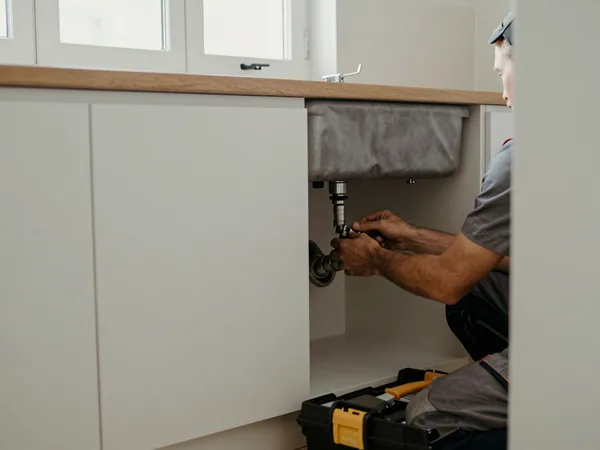
Maintenance requests with evidence
Tenants report with photos or video against a category, at one of four urgency levels — with an emergency flag that actually escalates.
A ticket lifecycle that holds up
Open, in progress, awaiting tenant, on hold, resolved, closed. Every change timestamped on a timeline nobody can quietly edit.
One thread per issue
Landlord, tenant and vendor notes in a single conversation against the ticket. Messages can't be deleted once sent.
Vendors, assigned and tracked
Route a job, share the expected visit window, track it to completion, and keep the cost against the unit.
Resolution the tenant confirms
You mark it resolved; they accept or reject with a comment. No response inside the window and it auto-closes, with the reason on the record.
Your whole team, scoped
Owners, property managers, bookkeepers and maintenance staff each see exactly what they should — and nothing else.
Request to close, in seven steps
- 1 Request — a tenant, manager or authorised user submits it, with photos if it helps.
- 2 Categorize — the issue is classified and its urgency determined — automatically, from the text.
- 3 Review — assess what is actually required.
- 4 Assign — to internal staff or an external vendor.
- 5 Execute — track the work while it is being done.
- 6 Verify — confirm it was completed satisfactorily — the tenant accepts or rejects.
- 7 Close — record the outcome and keep the history.
Connect Every Stakeholder
Message one tenant or five hundred
Send to an individual, a property, or a filtered group — everyone overdue, everyone with a lease expiring — with the recipient count shown before it goes.
Templates with the details filled in
Rent, lease, maintenance and onboarding templates with tenant name, property and due date merged per recipient. Save your own.
Reminders that send themselves
Rent due, overdue, payment received, lease expiring, renewal due, onboarding incomplete — each one switchable on or off by you.
Scheduled and recurring sends
Queue a notice for a date, or set it monthly. It goes out on time whether or not you're logged in.
Email, text and in-app, with fallback
Delivered on the channel each tenant prefers, falling back automatically when one fails — and honouring TCPA consent without you having to think about it.
A delivery log you can stand behind
What was sent, to whom, on which channel, delivered or failed, and when. Filterable, and there when a tenant says they never got it.
Deliver a Modern Resident Experience
Rent gets paid on time when paying is easy and the record is obvious. Your tenants get their own secure portal on any device — and every action they take lands back in your ledger without you re-keying a thing.
Receipts issued the moment a payment confirms.
Their own dashboard
What's due, when the lease ends, what needs signing, what's outstanding — and an action list that clears itself as they deal with it.
Rent paid in a few taps
Next, not today: ACH or card, autopay if they want it, the amount calculated for them including any late fee, with fees visible before they commit.
Every receipt, permanently
Downloadable the moment a payment confirms, with invoice history filterable by period — the paperwork their accountant asks for.
Maintenance they can track
Report with photos, watch the status change, message about access times, and confirm the work is actually done.
Lease and documents on hand
The signed lease, addenda, renewals, move-in checklists and inspection reports — plus a place to upload what you ask them for.
Notices they'll actually see
Announcements, building notices and reminders on the channel they chose, with critical payment alerts that can't be switched off.
The tenant relationship record
One relationship record
Tenant information, contact details, property, unit, lease, payment activity, documents and maintenance — held together rather than assembled when someone asks.
Answers without asking
Residents expect to find what they need without contacting a manager for every request. Most of what they ask for is something they could look up.
Turn Portfolio Data Into Intelligence Next
None of this runs today. Every rent cycle, payment and receipt is already captured against the lease — reporting is arithmetic over that ledger, so it follows the payment rails rather than leading them. Set out here so you can see what it will be, and hold us to it.
The portfolio at a glance
Occupancy overall and per property, vacant versus occupied units, turnover trends, and revenue by month, quarter or year.
Rent and payment reports
Invoices raised, payments received, what's overdue, late fees collected, and each tenant's payment history and consistency.
Occupancy and performance
Vacant unit lists, upcoming move-ins and move-outs, and property-by-property revenue comparison to find the unit that's dragging.
Lease and renewal reports
What's expiring, renewal completion rates and stay-duration trends — with drill-down straight to the lease and a follow-up you can send.
Drill down to the transaction
Every chart opens. Overdue amount becomes the list of who owes it; a revenue bar becomes the invoices behind it.
Records your accountant accepts
Schedule E-ready income and expense records and vendor cost totals by property, exportable to PDF, Excel or CSV with every export logged. Like everything in this section, not built yet.
See Beyond Individual Properties
The records below already exist in the product. What is being built is the layer that watches them and tells you which ones need you — for leases, and for comparing how properties are performing against each other.
Leases approaching expiration
Surfaced before the renewal conversation becomes urgent.
Upcoming renewals
With the terms carried across ready to be edited.
Missing documentation
Where a lease is short of something it should hold.
Outstanding obligations
What has been agreed but not yet done.
Payment exceptions
Where the money does not match the agreement.
Inactive leases
Records that have quietly stopped moving.
Connect Every Property Conversation and Service Provider
Property operations depend on people outside your team. They should not sit outside your records as well.
A profile per vendor
Service category, contact details, the properties they cover, the work assigned to them, the costs and the documents.
One workflow, start to close
Request → assign → accept → execute → verify → close, with each step timestamped against the job.
Costs against the unit
What the job cost, held on the property that incurred it rather than in a separate invoice pile.
Ratings and history
How a vendor has performed for you before, on the record rather than in someone's memory.
Vendor profiles, jobs, messaging and ratings run today. Vendor intelligence — response times, cost trends and coverage analysis — is on the roadmap.
Make Compliance Part of the Workflow
Compliance should not depend on calendars, folders and someone remembering. This is what we are building — identify, assign, collect, review, approve, record, renew. It needs the document store first, which is why it is not here yet.
Required documents
What each property, lease and tenant needs to hold, and whether it is there.
Expiry tracking
Certificates, insurance and identity documents with their dates, so renewal is prompted rather than remembered.
Approvals and inspections
Who signed off what, when, and against which unit.
An audit history
The full record of what was collected, reviewed, approved and renewed — retained rather than reconstructed.